
Excel2003 和 Excel2007 两个版本的最大行数和最大列数不同,2003 版的最大行数是 65536 行,最大列数是 256 列,2007 版及之后版本的最大行数是 1048576 行,最大列数是 16384 列。
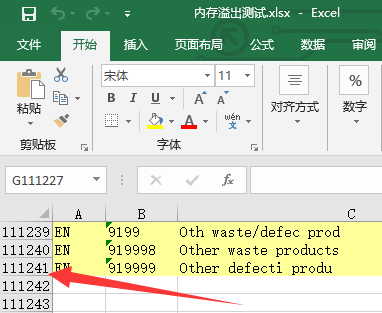
使用 POI 工具解析 Excel,若使用其用户模式,则解析包含少量数据的 Excel 没有任何问题,但是一旦解析包含大量数据的 Excel 就会出现内存溢出异常(比如记录达到 10 万条)。
因此我们采用 SAX 事件驱动模式来解析 Excel,下面是实现源码。
针对 Excel2007 版本的处理类:
1
2
3
4
5
6
7
8
9
10
11
12
13
14
15
16
17
18
19
20
21
22
23
24
25
26
27
28
29
30
31
32
33
34
35
36
37
38
39
40
41
42
43
44
45
46
47
48
49
50
51
52
53
54
55
56
57
58
59
60
61
62
63
64
65
66
67
68
69
70
71
72
73
74
75
76
77
78
79
80
81
82
83
84
85
86
87
88
89
90
91
92
93
94
95
96
97
98
99
100
101
102
103
104
105
106
107
108
109
110
111
112
113
114
115
116
117
118
119
120
121
122
123
124
125
126
127
128
129
130
131
132
133
134
135
136
137
138
139
140
141
142
143
144
145
146
147
148
149
150
151
152
153
154
155
156
157
158
159
160
161
162
163
164
165
166
167
168
169
170
171
172
173
174
175
176
177
178
179
180
181
182
183
184
185
186
187
188
189
190
191
192
193
194
195
196
197
198
199
200
201
202
203
204
205
206
207
208
209
210
211
212
213
214
215
216
217
218
219
220
221
222
223
224
225
226
227
228
229
230
231
232
233
234
235
236
237
238
239
240
241
242
243
244
245
246
247
248
249
250
251
252
253
254
255
256
257
258
259
260
261
262
263
264
265
266
267
268
269
270
271
272
273
274
275
276
277
278
279
280
281
282
283
284
285
286
287
288
289
290
291
292
293
294
295
296
297
298
299
300
301
302
303
304
305
306
307
308
309
310
311
312
313
314
315
316
317
318
319
320
321
322
323
324
325
326
327
328
329
330
331
332
333
334
335
336
337
338
339
340
341
342
343
344
345
346
347
348
349
350
351
352
353
354
355
356
357
358
359
360
361
362
363
364
365
366
367
368
369
370
371
372
373
374
375
376
377
378
379
380
381
382
383
384
385
386
387
388
389
390
391
392
393
394
395
396
397
398
399
400
401
402
403
404
405
406
407
408
409
410
411
412
413
414
415
import java.io.InputStream;
import java.util.ArrayList;
import java.util.Iterator;
import java.util.List;
import org.apache.poi.openxml4j.opc.OPCPackage;
import org.apache.poi.ss.usermodel.BuiltinFormats;
import org.apache.poi.ss.usermodel.DataFormatter;
import org.apache.poi.xssf.eventusermodel.XSSFReader;
import org.apache.poi.xssf.model.SharedStringsTable;
import org.apache.poi.xssf.model.StylesTable;
import org.apache.poi.xssf.usermodel.XSSFCellStyle;
import org.apache.poi.xssf.usermodel.XSSFRichTextString;
import org.xml.sax.Attributes;
import org.xml.sax.InputSource;
import org.xml.sax.SAXException;
import org.xml.sax.XMLReader;
import org.xml.sax.helpers.DefaultHandler;
import org.xml.sax.helpers.XMLReaderFactory;
/**
* POI 读取 Excel 有两种模式,一种是用户模式,一种是事件驱动模式,
* 采用 SAX 事件驱动模式解析 XLSX 文件可以有效解决内存溢出的问题,
* 该模式是 POI 官方推荐的读取大数据的模式。
*
* @author Daniel Ge
* @date 2019-8-29
*/
public class ExcelXlsxReader extends DefaultHandler {
/**
* 单元格中的数据可能的数据类型
*/
enum CellDataType {
BOOL, ERROR, FORMULA, INLINESTR, SSTINDEX, NUMBER, DATE, NULL
}
/**
* 共享字符串表
*/
private SharedStringsTable sst;
/**
* 上一次的索引值
*/
private String lastIndex;
/**
* 文件的绝对路径
*/
private String filePath = "";
/**
* 工作表索引
*/
private int sheetIndex = 0;
/**
* sheet名
*/
private String sheetName = "";
/**
* 总行数
*/
private int totalRows=0;
/**
* 一行内cell集合
*/
private List<String> cellList = new ArrayList<String>();
/**
* 一行内cell集合,临时存储 cellList,因为后面会清除 cellList
*/
private List<String> tempCellList = new ArrayList<String>();
/**
* 所有行集合,也就是整张表的数据
*/
private List<List<String>> allCellList = new ArrayList<List<String>>();
/**
* 判断整行是否为空行的标记
*/
private boolean flag = false;
/**
* 当前行
*/
private int curRow = 1;
/**
* 当前列
*/
private int curCol = 0;
/**
* T元素标识
*/
private boolean isTElement;
/**
* 异常信息,如果为空则表示没有异常
*/
private String exceptionMessage;
/**
* 单元格数据类型,默认为字符串类型
*/
private CellDataType nextDataType = CellDataType.SSTINDEX;
private final DataFormatter formatter = new DataFormatter();
/**
* 单元格日期格式的索引
*/
private short formatIndex;
/**
* 日期格式字符串
*/
private String formatString;
// 定义前一个元素和当前元素的位置,用来计算其中空的单元格数量,如A6和A8等
private String preRef = null, ref = null;
// 定义该文档一行最大的单元格数,用来补全一行最后可能缺失的单元格
private String maxRef = null;
/**
* 单元格
*/
private StylesTable stylesTable;
/**
* 遍历工作簿中所有的电子表格,并缓存在mySheetList中
*/
public List<List<String>> process(String filename) throws Exception {
filePath = filename;
OPCPackage pkg = OPCPackage.open(filename);
XSSFReader xssfReader = new XSSFReader(pkg);
stylesTable = xssfReader.getStylesTable();
SharedStringsTable sst = xssfReader.getSharedStringsTable();
XMLReader parser = XMLReaderFactory.createXMLReader(
"org.apache.xerces.parsers.SAXParser");
this.sst = sst;
parser.setContentHandler(this);
XSSFReader.SheetIterator sheets = (XSSFReader.SheetIterator) xssfReader.getSheetsData();
while (sheets.hasNext()) {
curRow = 1; // 标记初始行为第一行
sheetIndex++;
// sheets.next()和sheets.getSheetName()不能互换,否则报错
InputStream sheet = sheets.next();
sheetName = sheets.getSheetName();
InputSource sheetSource = new InputSource(sheet);
// 解析excel的每条记录,会依次执行startElement()、characters()、endElement()
parser.parse(sheetSource);
sheet.close();
}
return allCellList;
}
/**
* 第一个执行
*/
public void startElement(String uri, String localName, String name, Attributes attributes)
throws SAXException {
// c => 单元格
if ("c".equals(name)) {
// 前一个单元格的位置
if (preRef == null) {
preRef = attributes.getValue("r");
} else {
preRef = ref;
}
// 当前单元格的位置
ref = attributes.getValue("r");
// 设定单元格类型
this.setNextDataType(attributes);
}
// 当元素为t时
if ("t".equals(name)) {
isTElement = true;
} else {
isTElement = false;
}
// 置空
lastIndex = "";
}
/**
* 第二个执行
* 得到单元格对应的索引值或是内容值
* 如果单元格类型是字符串、INLINESTR、数字、日期,则lastIndex是索引值
* 如果单元格类型是布尔值、错误、公式,则lastIndex是内容值
*/
public void characters(char[] ch, int start, int length) throws SAXException {
lastIndex += new String(ch, start, length);
}
/**
* 第三个执行
*/
public void endElement(String uri, String localName, String name) throws SAXException {
// t元素也包含字符串
if (isTElement) {
// 将单元格内容加入rowlist中,在这之前先去掉字符串前后的空白符
String value = lastIndex.trim();
cellList.add(curCol, value);
curCol++;
isTElement = false;
// 如果里面某个单元格含有值,则标识该行不为空行
if (value != null && !"".equals(value)) {
flag = true;
}
} else if ("v".equals(name)) {
// v => 单元格的值,如果单元格是字符串,则v标签的值为该字符串在SST中的索引
// 根据索引值获取对应的单元格值
String value = this.getDataValue(lastIndex.trim(), "");
// 补全单元格之间的空单元格
if (!ref.equals(preRef)) {
int len = countNullCell(ref, preRef);
for (int i = 0; i < len; i++) {
cellList.add(curCol, "");
curCol++;
}
}
cellList.add(curCol, value);
curCol++;
// 如果里面某个单元格含有值,则标识该行不为空行
if (value != null && !"".equals(value)) {
flag = true;
}
} else {
// 如果标签名称为row,这说明已到行尾,调用optRows()方法
if ("row".equals(name)) {
// 默认第一行为表头,以该行单元格数目为最大数目
if (curRow == 1) {
maxRef = ref;
}
// 补全一行尾部可能缺失的单元格
if (maxRef != null) {
int len = countNullCell(maxRef, ref);
for (int i = 0; i <= len; i++) {
cellList.add(curCol, "");
curCol++;
}
}
// 该行不为空行且该行不是第一行,则发送(第一行为列名,不需要)
if (flag && curRow != 1) {
ExcelReaderUtil.sendRows(filePath, sheetName, sheetIndex, curRow, cellList);
tempCellList = new ArrayList<String>();
Iterator<String> it = cellList.iterator();
while (it.hasNext()) {
tempCellList.add(it.next());
}
// 添加进整表集合
allCellList.add(tempCellList);
totalRows++;
}
cellList.clear();
curRow++;
curCol = 0;
preRef = null;
ref = null;
flag = false;
}
}
}
/**
* 处理数据类型
*/
public void setNextDataType(Attributes attributes) {
// cellType为空,则表示该单元格类型为数字
nextDataType = CellDataType.NUMBER;
formatIndex = -1;
formatString = null;
String cellType = attributes.getValue("t"); // 单元格类型
String cellStyleStr = attributes.getValue("s");
String columnData = attributes.getValue("r"); // 获取单元格的位置,如A1,B1
if ("b".equals(cellType)) { // 处理布尔值
nextDataType = CellDataType.BOOL;
} else if ("e".equals(cellType)) { // 处理错误
nextDataType = CellDataType.ERROR;
} else if ("inlineStr".equals(cellType)) {
nextDataType = CellDataType.INLINESTR;
} else if ("s".equals(cellType)) { // 处理字符串
nextDataType = CellDataType.SSTINDEX;
} else if ("str".equals(cellType)) {
nextDataType = CellDataType.FORMULA;
}
if (cellStyleStr != null) { // 处理日期
int styleIndex = Integer.parseInt(cellStyleStr);
XSSFCellStyle style = stylesTable.getStyleAt(styleIndex);
formatIndex = style.getDataFormat();
formatString = style.getDataFormatString();
if (formatString.contains("m/d/yy")) {
nextDataType = CellDataType.DATE;
formatString = "yyyy-MM-dd hh:mm:ss";
}
if (formatString == null) {
nextDataType = CellDataType.NULL;
formatString = BuiltinFormats.getBuiltinFormat(formatIndex);
}
}
}
/**
* 对解析出来的数据进行类型处理
* @param value 单元格的值,value代表解析:BOOL的为0或1, ERROR的为内容值,FORMULA的为内容值,INLINESTR的为索引值需转换为内容值,SSTINDEX的为索引值需转换为内容值, NUMBER为内容值,DATE为内容值
* @param thisStr 一个空字符串
*/
public String getDataValue(String value, String thisStr) {
switch (nextDataType) {
// 这几个的顺序不能随便交换,交换了很可能会导致数据错误
case BOOL: // 布尔值
char first = value.charAt(0);
thisStr = first == '0' ? "FALSE" : "TRUE";
break;
case ERROR: // 错误
thisStr = "\"ERROR:" + value.toString() + '"';
break;
case FORMULA: // 公式
thisStr = '"' + value.toString() + '"';
break;
case INLINESTR:
XSSFRichTextString rtsi = new XSSFRichTextString(value.toString());
thisStr = rtsi.toString();
rtsi = null;
break;
case SSTINDEX: // 字符串
String sstIndex = value.toString();
try {
int idx = Integer.parseInt(sstIndex);
// 根据idx索引值获取内容值
XSSFRichTextString rtss = new XSSFRichTextString(sst.getEntryAt(idx));
thisStr = rtss.toString();
rtss = null;
} catch (NumberFormatException ex) {
thisStr = value.toString();
}
break;
case NUMBER: // 数字
if (formatString != null) {
thisStr = formatter.formatRawCellContents(
Double.parseDouble(value), formatIndex, formatString).trim();
} else {
thisStr = value;
}
thisStr = thisStr.replace("_", "").trim();
break;
case DATE: // 日期
thisStr = formatter.formatRawCellContents(
Double.parseDouble(value), formatIndex, formatString);
// 对日期字符串作特殊处理,去掉T
thisStr = thisStr.replace("T", " ");
break;
default:
thisStr = " ";
break;
}
return thisStr;
}
public int countNullCell(String ref, String preRef) {
// excel2007最大行数是1048576,最大列数是16384,最后一列列名是XFD
String xfd = ref.replaceAll("\\d+", "");
String xfd_1 = preRef.replaceAll("\\d+", "");
xfd = fillChar(xfd, 3, '@', true);
xfd_1 = fillChar(xfd_1, 3, '@', true);
char[] letter = xfd.toCharArray();
char[] letter_1 = xfd_1.toCharArray();
int res = (letter[0] - letter_1[0]) * 26 * 26
+ (letter[1] - letter_1[1]) * 26 + (letter[2] - letter_1[2]);
return res - 1;
}
public String fillChar(String str, int len, char let, boolean isPre) {
int len_1 = str.length();
if (len_1 < len) {
if (isPre) {
for (int i = 0; i < (len - len_1); i++) {
str = let + str;
}
} else {
for (int i = 0; i < (len - len_1); i++) {
str = str + let;
}
}
}
return str;
}
public String getExceptionMessage() {
return exceptionMessage;
}
}工具类:
1
2
3
4
5
6
7
8
9
10
11
12
13
14
15
16
17
18
19
20
21
22
23
24
25
26
27
28
29
30
31
32
33
34
35
36
37
38
39
40
41
42
43
44
45
46
47
48
49
50
import java.util.ArrayList;
import java.util.List;
public class ExcelReaderUtil {
// excel2003扩展名
public static final String EXCEL03_EXTENSION = ".xls";
// excel2007扩展名
public static final String EXCEL07_EXTENSION = ".xlsx";
/**
* 每获取一条记录,即打印
* 在flume里每获取一条记录即发送,而不必缓存起来,可以大大减少内存的消耗
*/
public static void sendRows(String filePath, String sheetName, int sheetIndex,
int curRow, List<String> cellList) {
StringBuffer oneLineSb = new StringBuffer();
oneLineSb.append(filePath);
oneLineSb.append("--");
oneLineSb.append("sheet" + sheetIndex);
oneLineSb.append("::" + sheetName);
oneLineSb.append("--");
oneLineSb.append("row" + curRow);
oneLineSb.append("::");
for (String cell : cellList) {
oneLineSb.append(cell.trim());
oneLineSb.append("|");
}
String oneLine = oneLineSb.toString();
// 去除最后一个分隔符
if (oneLine.endsWith("|")) {
oneLine = oneLine.substring(0, oneLine.lastIndexOf("|"));
}
System.out.println(oneLine);
}
public static List<List<String>> readExcel(String fileName) throws Exception {
List<List<String>> dataList = new ArrayList<List<String>>();
if (fileName.endsWith(EXCEL03_EXTENSION)) { // 处理excel2003文件
// ......
} else if (fileName.endsWith(EXCEL07_EXTENSION)) {// 处理excel2007文件
ExcelXlsxReader excelXlsxReader = new ExcelXlsxReader();
dataList = excelXlsxReader.process(fileName);
} else {
throw new Exception("文件格式错误,文件扩展名只能是xls或xlsx");
}
System.out.println("发送的总行数:" + dataList.size());
return dataList;
}
}测试程序:
1
2
3
4
5
6
7
8
9
10
11
12
13
14
15
16
17
18
19
20
21
22
23
24
25
26
27
import java.io.File;
import java.util.ArrayList;
import java.util.List;
import com.kindpetro.excel.utils.ExcelReaderUtil;
import com.kindpetro.excel.utils.ExcelTool;
/**
* 物料解析类,用于解析表:物料.xlsx
* @author Daniel Ge
* @date 2019-8-13
*/
public class OutOfMemoryTest {
public static void main(String[] args) {
try {
File root = new File("E:\\TestFile\\ExcelPOITest\\outOfMemoryTest");
File[] fs = root.listFiles();
for (int i = 0; i < fs.length; i++) {
File f = new File(fs[i].getAbsolutePath());
List<List<String>> tempList = new ArrayList<List<String>>();
tempList = ExcelReaderUtil.readExcel(f.getAbsolutePath());
}
} catch (Exception e) {
// ......
}
}
}运行结果:
